
Guides for building owners
How to create a new project
A project is a GitHub repository copied from a published master version. Only organization admins can create projects
Published
Simon Dilhas (Cofounder abstract & BIM Pirate)
Start Free NowA project is a new GitHub repository copied from a published template release, never from a draft or from Live Data. Only organization admins can create projects.
Before you start
- You are an organization admin.
- The master template has at least one published version. If the master-version list is empty, open the template and use Publish Version first.
Create the repository
- On the editor home screen, select your organization.
- Click + New project.
- Fill in Name, Number, and Language.
- Choose the Master version (the published release to copy).
- Click Create repository.
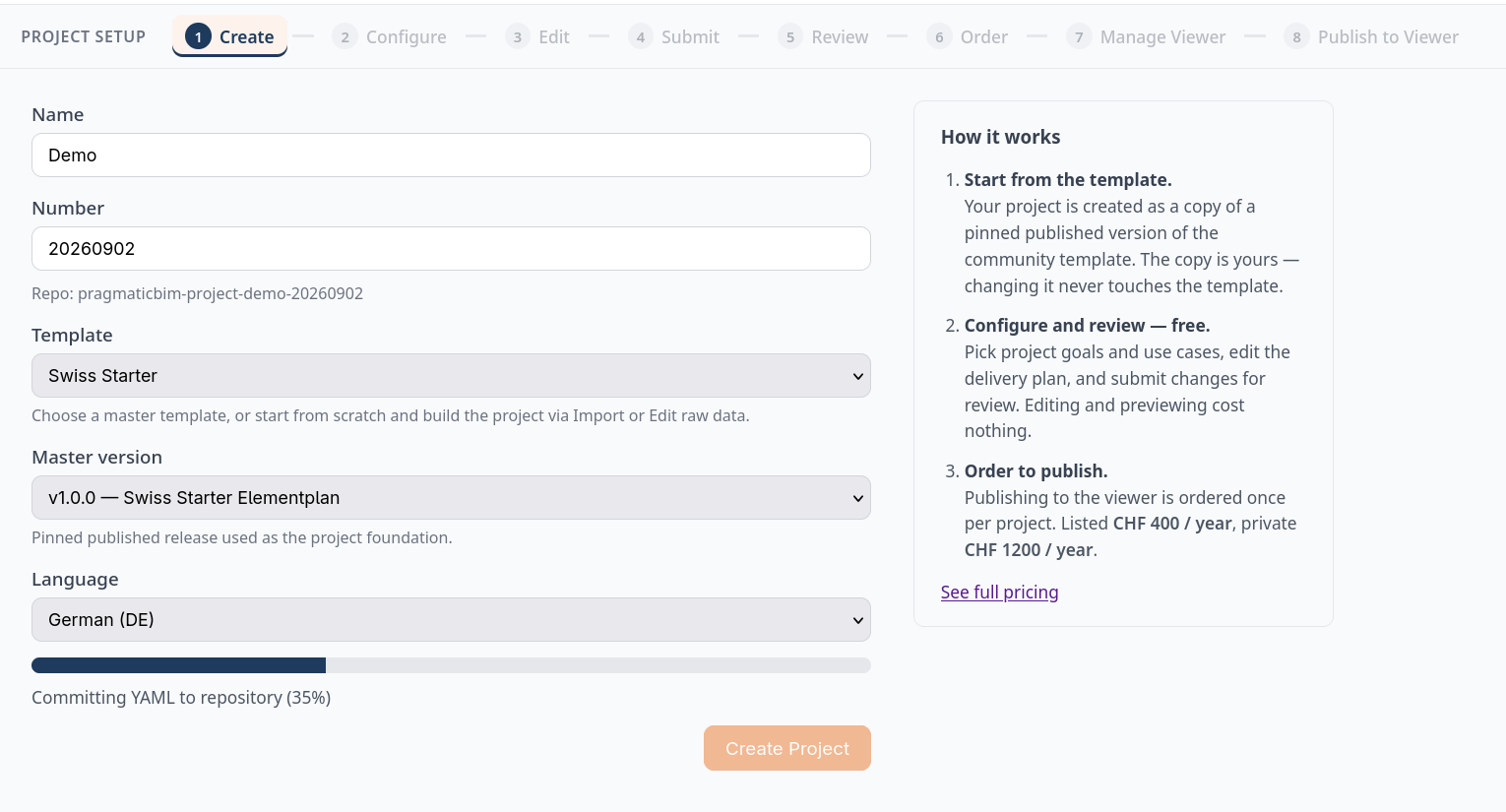
The editor creates the GitHub repo, opens a first-config draft, and takes you to Goals.
The template and master version are locked after create. You can still edit name, number, and language later on a draft.
What you have now
- A project repository (shown as something like
yourorg-project-campus-xy-007). - A draft named
first-configso you can configure immediately: pick project goals and/or use cases. - Nothing in the viewer yet. The frontend only lists published project releases. That second freeze comes after you configure, merge to Live Data, and Publish Version.
Continue with Configure a project.