





No more change orders

Actionable Project & BIM Requirements

Vague project briefs, room programmes, and BIM manuals create costly ambiguity. pragmaticBIM gives owners one clear, machine-readable contract for what the project must deliver.

  • Kill Unjustified Fee Claims: Checkable requirements with a purpose and a delivery date. Every delivery is checked before payment, not argued over afterwards.
  • Contract-Safe Change Management: Every change to project and data requirements is versioned and traceable. You always know which version is contractually binding, from the first order to project quality management.
  • Setup in Minutes: Project or BIM managers select their project goals, start from the pragmaticBIM Reference, and generate clear data contracts with zero hassle.

Trusted by leading AEC innovators

The problem

The problem is the order

With BIM and without BIM. Requirements sit in texts, guidelines, and appendices, often mixed with solutions. What the client actually needs gets settled in design meetings instead of in the order. BIM made this worse, and AI makes it worse still.

Data without a purpose

Requirements are copied together from templates because that is just how BIM is done. Nobody can say which decision they are meant to support. Planners price the uncertainty in as a risk premium, deliver, and nobody uses the data.

Nothing can be checked

What isn't written so it can be checked can neither be accepted nor settled in a dispute. Whoever has more leverage wins. In the end the difference is split, often 50/50, and the relationship is damaged. AI produces convincing-looking documents in seconds. You can no longer tell from them whether the content is right.

Project management and BIM talk past each other

Project management talks about goals, deadlines, and decisions; BIM management about models and checking rules. The information requirements end up in the technical appendix. Project management doesn't read it, and BIM management doesn't know the project goals.

See the principle

Try it yourself

Pick a use and set the goals. The use determines frame conditions, scenarios, and room types; the goals determine workflows, elements, and documents. You never pick information for its own sake.

Goals

Security / critical infrastructure

Costs & quantities

Schedule & coordination

Decision certainty

Permit certainty

Design certainty

Verifiable sustainability

Project definition

Information requirements

+4 more

You choose the matching solution for each scenario in the editor. Open the editor

What is pragmaticBIM?

A Platform for Requirements Management in Projects with and without BIM

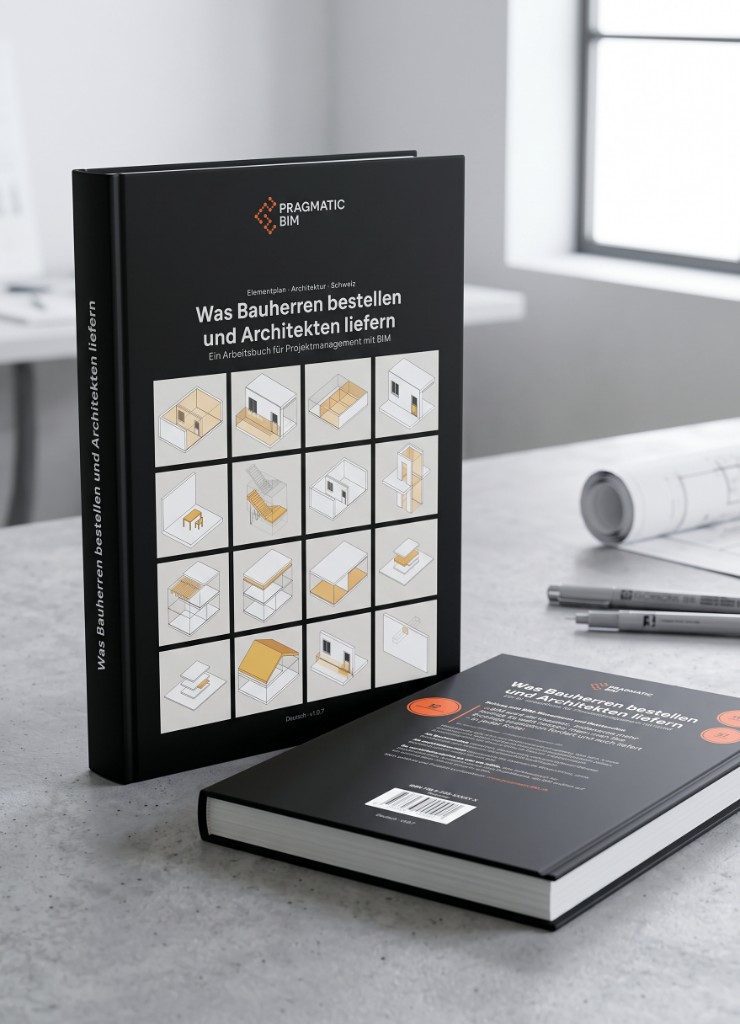
pragmaticBIM connects the open pragmaticBIM Reference, the curated book edition, the editor for adapting it, and the viewer for communicating published requirements.

Printed pragmaticBIM book on a work table with drawings and pens

1 · Understand

Book

The method: order results instead of prescribing methods. Why these elements, how to order them, and how to check them.

3 · Adapt

Editor

Start with the Reference as a template: choose phases and domains, adapt attributes, check requirements, and publish.

4 · Share

Viewer

Everyone on the project sees exactly what they have to deliver, without a login and without Excel.

How it works

From template to Actions

A streamlined workflow that aligns project requirements and building data with real business goals through five simple steps.

1

Choose or Create a Template

Every project is based on a template. This can be the pragmaticBIM Reference or an organization-specific one.

2

Configure

Define usage scenarios and room types, then configure requirements from business goals or predefined use cases.

3

Adapt

Change the data requirements by importing other use case definitions, IDS files, or by working directly on the requirements.

4

Present

Provide different views on the data. A web interface as quick reference, IDS files for checking, or reports for contracts.

5

Act

Run project-specific Actions on the published plan. Print site-logistics QR labels, check incoming IFCs with IDS Check, or open Dashboards.

Introduction / concept
Viewer
Editor

The platform

Versioned Project & BIM requirements

Merge requirements per use case

Combine templates across clients, phases, or workflows into one consistent data contract.

Extensible action plugins

Connect to your validation tools and extend workflows with custom integrations.

Version-controlled requirements

Treat your data contract like code - Draft, Review, Live Data, and Publish Version, with a full change history.

Multi-language support

Publish specs in DE, FR, IT, and EN - automatically, from a single source.

Built-in IFC consistency checks

Validate definitions against the IFC standard before they leave your desk.

Hosted in Switzerland

Your project data stays in Switzerland - secure, GDPR-compliant, and under your control.

From Swiss AEC teams

Why owners replace static briefs and BIM manuals

Bernhard Flühler

With Simon's support, we were able to deepen our BIM expertise in a targeted way and integrate it optimally into our office processes. Clear modelling standards and the element plan were the key to success. Model-based cost estimation worked smoothly right away and greatly strengthened BIM acceptance across the entire team.

Bernhard Flühler

Partner, Gähler Flühler Fankhauser Architekten

Giuseppe Acciardi

The element plan is a key component for us to specify data requirements. Our path was long: from an Excel sheet with version chaos and the difficulty of checking data deliveries, through collaborative work in a database and automatic IDS generation, to today's form where requirements are treated like code and have helped us keep simplifying requirements and communicating them better. The journey isn't over yet, but we're on it.

Giuseppe Acciardi

Head of BIM Program, armasuisse Immobilien

Julie Picarel

The switch from Excel to a database solution with pragmaticBIM was challenging but decisive. For the first time, we were able to capture our infrastructure data in a structured, detailed way that all project stakeholders could use. A valuable and sustainable improvement.

Julie Picarel

Senior Project Leader, Civil Engineering/BIM, Flughafen Zürich

Read the case study
Peter Maag

In GIS, we learned that what matters is not the volume of data, but its structure, quality, and usability. pragmaticBIM brings exactly this pragmatic approach to BIM. Use cases take centre stage and help you specify only what is actually needed. That prevents unnecessary complexity and creates real value for projects and operations.

Peter Maag

Head of Geomatics & Utility Coordination, Flughafen Zürich

Read the case study

Pricing

Pricing that scales with your projects

Order versioned project and BIM requirements from your goals. Add Project Briefing when you publish a room programme and project brief; continue into IDS, Excel, and a live Presenter from the same source.

Pricing that scales with your projects
Feature Free 0 CHF Upgradeable Project 400 CHF / year per project Pay by invoice Private Project 1'200 CHF / year per project Pay by invoice Planner 1'800 CHF / year per project Pay by invoice Full Enterprise 16'000 CHF / year Pay by invoice
Start Now Open the editor Open the editor
Scope Drafts only Listed project Private project Planner / Department Organization-wide
Templates pragmaticBIM Reference pragmaticBIM Reference pragmaticBIM Reference Up to 3 own Unlimited own
Active projects Drafts only 1 1 Per project Unlimited
Roles Editor only Editor only Editor only Editors + admins Editors + admins
Branding Not included Not included Not included Custom subdomain Custom domain
Support Docs Email Email Standard SLA Priority SLA

Included in all plans

  • Project and exchange requirements from goals: checkable contracts, not 300-page manuals
  • Goals in, data contract out - pick project ambition, get the matching requirements
  • Interactive Presenter
  • IDS + Excel + PDF from one source
  • Multilingual: DE, FR, IT, EN
  • Versioned review (Git)
  • Swiss hosting
  • Access to additional actions per project

Add-on module

Project Briefing

Configure usage scenarios, the room programme and the project brief here for free. Add the module only when you publish the project.

  • Define usage scenarios from proven templates
  • Build on predefined room types
  • Hand over a professional programme to the design team

+ 750 CHF

Per year, per published project

Professional services

Discovery Package

Workshop with leadership to identify use cases and their data requirements.

1-day workshop (3'000 CHF). Language English or German.

Implementation Service

Transition your legacy PDF manuals into structured data infrastructure. We convert your existing guidelines into clean machine-readable schemas.

FAQ

Frequently Asked Questions

Answers about versioned project and BIM requirements, Project Briefing, the open standard, Git traceability, IDS exports, and Actions on the published plan.

Frequently Asked Questions

What is a project and BIM requirements data contract?

Project briefs, room programmes, and BIM manuals often become disconnected PDF and spreadsheet files that are difficult to trace, check, and enforce.

pragmaticBIM turns them into one structured, versioned, machine-readable contract. Define what the project needs once, publish a controlled version, and use the same source for human-readable reports, IDS, and automated checks.

How does pragmaticBIM fit abstract's contrarian approach?

Everyone tells you to follow ISO 19650 and write information requirement documents. pragmaticBIM asks what you actually need and turns it into a contract that people, software, and AI can read and trace.

That is abstract's Define step: disagree with documentation-first projects, automate checkable requirements instead of 300-page manuals nobody reads.

How does the platform handle multi-party project collaboration?

The platform replaces dense, static documents with clear, actionable data contracts. Stakeholders agree on goal levels, not on a raw use-case checklist. The platform activates the use cases those goals require, so every party sees a contract that matches the project.

External collaborators can coordinate seamlessly depending on your plan:

  • Free: Editor-only drafts on the pragmaticBIM Reference. No publish, no listing. Community and docs support.
  • Project Plan: Email access for planners and clients on one live Presenter project
  • Private Project: Email access on one live Presenter project that is not listed
  • Planner: As many Presenter projects as a planner / department needs, billed per project, on up to 3 own templates
  • Full Enterprise: Unlimited projects, org-wide editor admins, and default viewer lists
Can I export the data contracts into different formats for my team?

Yes. The platform presents and exports your data standards in every format your team needs.

Human-readable documentation for reference, machine-readable configurations for software tools - bridged automatically, without manual re-entry.

Does this platform integrate with standard BIM software?

Yes. Built-in IFC consistency checks and standard schema format support are included.

Automated validation ensures incoming model data matches your EIR data contracts exactly - no tedious manual data audits.

What is Project Briefing, and how does it produce BIM requirements?

Project Briefing is the module for defining usage scenarios, building on predefined room types, and producing a professional room programme and project brief for the design team.

Those decisions continue into model specifications, IDS, and validation, so BIM requirements become a byproduct of the project brief. Configuration is free. The add-on costs 750 CHF per year for each project when you order publication.

What are the pricing options available for the platform?

We offer five pricing tiers tailored to your organization's scale. Free is self-serve in the editor. Project and Private Project plans are ordered and invoiced through abstract; Planner and Full Enterprise run on an agreement with your organization.

  • Free: 0 CHF. Editor-only drafts on the pragmaticBIM Reference. No publish, no listing. Unlimited drafts, 0 published. Community and docs support. Upgradeable.
  • Project Plan: 400 CHF / year per project. Start from the pragmaticBIM Reference, import additional requirements by IDS, configure one project by goal levels, one live Presenter, German and English. Pay by invoice.
  • Private Project: 1'200 CHF / year per project. The project is not listed. Start from the pragmaticBIM Reference, import additional requirements by IDS, configure one project by goal levels, one live Presenter, German and English. Pay by invoice.
  • Planner: 1'800 CHF / year per project, plus a one-time onboarding fee of 1'000 CHF that includes up to 3 own templates. Planner / Department, as many Presenter projects as you need, separate editor and admin roles, custom subdomain, standard plugins and API access. Pay by invoice.
  • Full Enterprise: 16'000 CHF / year. Organization-wide, unlimited projects with no per-project fee, unlimited own templates, custom domain, dedicated GitHub repo, custom actions and pipelines, priority SLA. Pay by invoice.
How does pragmaticBIM differ from Plannerly?

Both speak ISO 19650. The medium of truth differs. They can coexist: Plannerly runs the delivery team's documents; pragmaticBIM is what the appointing party orders first.

  • Plannerly: Project execution suite. ISO 19650 as documents (BEP, eSign, CDE, in-app Verify).
  • pragmaticBIM: Appointing-party ordering. ISO 19650 as data (goals, workflows, IDP, then IDS, Excel, and Presenter).
How does pragmaticBIM compare to bimQ?

Different architectures for defining and managing requirements.

  • bimQ: Traditional heavy database for internal asset standardization and technical validation rules
  • pragmaticBIM: Lightweight GitHub-style versioning - data contracts like clean code, transparent change history, goal-driven configuration instead of a use-case checklist
How does pragmaticBIM differ from BriefBuilder?

Both support structured project briefing, but the underlying source of truth is different.

  • BriefBuilder: A dedicated workflow for creating and managing project briefs
  • pragmaticBIM: Project and BIM requirements built on an open, machine-readable standard, with Git-style commits that record who changed what and why, plus immutable published versions
  • AI-ready by design: Structured requirements with version history and known provenance can be safely read, compared, generated, and reviewed by AI
Why use pragmaticBIM if I already use a standard IDS Editor (like Solibri)?

An IDS Editor and a data contract platform solve different problems.

  • IDS Editor (e.g. Solibri): Excellent for creating raw, machine-readable validation files - but no collaborative framework
  • pragmaticBIM: Full platform - host requirements in a web portal where clients and collaborators align on goal levels and legally agree before modeling begins
How does pragmaticBIM handle requirement changes compared to static .ids files?

Instead of managing dozens of detached, un-versioned .ids or Excel files across a CDE, pragmaticBIM uses GitHub-style versioning. Every update is permanently committed as a fixed, controlled version.

The platform records who made each change, what was altered, and why - eliminating accidental edits and lost tracking.

Your team always works from a strictly managed, live single source of truth instead of trading static, unverified files back and forth.

Contact

abstract ag

Imprint · Picassoplatz 4, 4052 Basel